

The Hidden Cost of "Native" Integration
Last month, while implementing governance controls for a client's AKS environment, I discovered something that Azure's documentation glosses over: Azure Policy for Kubernetes, despite its seamless integration, cannot automatically generate resources based on policy violations. When a new namespace was created without proper network isolation, Azure Policy could only report the violation or block the namespace creation entirely, but it couldn't automatically create the missing NetworkPolicy to secure the environment.
This limitation forced a choice between two suboptimal approaches: either maintain complex automation scripts outside the policy engine, or manually remediate violations as they occurred. Neither option scaled well for a 50+ namespace environment with multiple development teams.
This discovery led to implementing Kyverno, a Kubernetes-native policy engine that excels precisely where Azure Policy falls short. But rather than choosing one or the other, we discovered that a hybrid approach which leveraged Azure Policy for compliance reporting and Kyverno for advanced automation, provided the best of both worlds.
This post explores when Azure Policy suffices, when Kyverno is essential, and how to implement a hybrid governance strategy that satisfies both compliance requirements and operational efficiency.
The Azure Policy Promise vs. Reality
What Azure Policy Does Well
Azure Policy for Kubernetes delivers on its core promise of centralized governance across Azure resources:
Strengths:
- Unified Dashboard: Single pane of glass for compliance across all Azure resources
- Enterprise Reporting: Built-in compliance reports that auditors understand
- Zero Infrastructure: No additional components to deploy or maintain
- Azure Integration: Seamless integration with Azure AD, RBAC, and management groups
- Scale: Proven to handle thousands of resources across multiple subscriptions
- Foundation for AKS Features: Powers Deployment Safeguards in AKS Automatic (implemented with Azure Policy + Gatekeeper)
Use Cases Where Azure Policy Excels:
- Compliance reporting for SOC 2, ISO 27001, FedRAMP audits
- Organizational policy enforcement across multiple AKS clusters
- Integration with Azure governance frameworks
- Environments where simplicity trumps flexibility
The Critical Limitations
However, production experience reveals significant gaps that require careful consideration:
1. Resource Generation Limitation
# Azure Policy CAN do this - validate, deny, and mutate existing resources
apiVersion: v1
kind: Namespace
metadata:
  name: backend-services
  # Azure Policy can DENY this namespace creation if it lacks required labels
  # Azure Policy can MUTATE to add missing labels/annotations

# Azure Policy CANNOT do this - generate new sibling resources
apiVersion: networking.k8s.io/v1
kind: NetworkPolicy
metadata:
  name: default-deny-all
  namespace: backend-services
spec:
  podSelector: {}
  policyTypes:
  - Ingress
  - Egress
While Azure Policy supports the mutate effect for modifying resources during admission, it cannot generate new resources like the NetworkPolicy above to automatically secure namespaces.
2. Complex Conditional Logic Constraints
# This type of complex conditional logic is challenging in Azure Policy
# "If namespace has label 'tier=database', then require specific annotations,
#  specific node selectors, AND generate a corresponding monitoring ServiceMonitor"
3. Custom Resource Definition (CRD) Support Limitations
Azure Policy can target CRDs via apiGroups and kinds in policy definitions, but faces restrictions on data replication into OPA's cache (via metadata.gatekeeper.sh/requires-sync-data), which is limited to built-in policies. This makes certain advanced custom rules more complex:
- Service Mesh policies (Istio, Linkerd)
- GitOps configurations (ArgoCD Applications)
- Monitoring configurations (Prometheus ServiceMonitors)
- Security tools (Falco Rules, custom operators)
4. Documented Scale and Platform Limitations
According to Microsoft's official documentation, the Azure Policy add-on has specific limitations:
- Maximum 10,000 pods per cluster (add-on support limit, not AKS cluster limit)
- Maximum 500 non-compliant records per policy per cluster
- Add-on deployable only to Linux node pools (enforcement still applies to all workloads cluster-wide, including Windows containers, as the admission controller runs at the API server level)
- Some built-in security policies won't apply to Windows pods (Windows lacks Linux security contexts)
- Additional restrictions on reasons for non-compliance and exemptions in Microsoft.Kubernetes.Data mode
- Potential admission latency impact (workload and policy dependent)
All limitations documented in the same Microsoft Learn page that covers external data support (enabled since add-on v1.4.0) and resource estimates.
Kyverno: The Kubernetes-Native Alternative
What Makes Kyverno Different
Kyverno (Greek for "govern") takes a fundamentally different approach to policy management:
Core Philosophy:
- YAML-Native: Policies are Kubernetes resources, not a separate DSL
- Four Operations: Validate, Mutate, Generate, and Cleanup resources
- Admission Control: Real-time policy enforcement at the Kubernetes API level
- Background Scanning: Continuous compliance monitoring of existing resources
Kyverno's Unique Capabilities
1. Automatic Resource Generation
# Automatically create NetworkPolicy for any new namespace
apiVersion: kyverno.io/v1
kind: ClusterPolicy
metadata:
  name: generate-default-network-policy
spec:
  background: false
  rules:
  - name: default-deny-all
    match:
      any:
      - resources:
          kinds: ["Namespace"]
    exclude:
      any:
      - resources:
          namespaces: ["kube-system","kube-public","kyverno"]
    generate:
      synchronize: true
      apiVersion: networking.k8s.io/v1
      kind: NetworkPolicy
      name: default-deny-all
      namespace: "{{ request.object.metadata.name }}"
      data:
        spec:
          podSelector: {}
          policyTypes: ["Ingress","Egress"]
Note:ClusterPolicyapplies cluster-wide and can target cluster-scoped resources likeNamespace. UsePolicyfor namespace-local rules that only apply within a specific namespace. (Kyverno documentation)
This policy automatically creates a default-deny NetworkPolicy whenever a new namespace is created.
2. Complex Mutation Logic
# Automatically add security context to pods in production namespaces
apiVersion: kyverno.io/v1
kind: ClusterPolicy
metadata:
  name: add-security-context
spec:
  rules:
  - name: add-non-root-security-context
    match:
      any:
      - resources:
          kinds:
          - Pod
          namespaces:
          - production
          - staging
    mutate:
      patchStrategicMerge:
        spec:
          securityContext:
            runAsNonRoot: true
            runAsUser: 1000
            fsGroup: 2000
          containers:
          - (name): "*"
            securityContext:
              allowPrivilegeEscalation: false
              capabilities:
                drop:
                - ALL
              readOnlyRootFilesystem: true
3. Advanced Conditional Logic
# Complex conditional: If database tier, require encrypted storage
apiVersion: kyverno.io/v1
kind: ClusterPolicy
metadata:
  name: database-security-requirements
spec:
  rules:
  - name: require-encrypted-storage
    match:
      any:
      - resources:
          kinds:
          - Pod
    preconditions:
      all:
      - key: "{{request.object.metadata.labels.tier || ''}}"
        operator: Equals
        value: database
    validate:
      message: "Database pods must use encrypted storage"
      pattern:
        spec:
          volumes:
          - (name): "*"
            persistentVolumeClaim:
              claimName: "?*"
        # Additional validation would check PVC for encryption
4. Custom Resource Support
# Generate Prometheus ServiceMonitor for labeled services
apiVersion: kyverno.io/v1
kind: ClusterPolicy
metadata:
  name: generate-service-monitor
spec:
  rules:
  - name: create-service-monitor
    match:
      any:
      - resources:
          kinds:
          - Service
    preconditions:
      all:
      - key: "{{request.object.metadata.labels.monitor || ''}}"
        operator: Equals
        value: "true"
    generate:
      synchronize: true
      apiVersion: monitoring.coreos.com/v1
      kind: ServiceMonitor
      name: "{{request.object.metadata.name}}-monitor"
      namespace: "{{request.object.metadata.namespace}}"
      data:
        spec:
          selector:
            matchLabels:
              app: "{{request.object.metadata.labels.app}}"
          endpoints:
          - port: metrics
Kyverno's Limitations
However, Kyverno isn't without constraints:
Operational Overhead:
- Requires deployment and maintenance of controller components
- No centralized multi-cluster management (without additional tooling)
- Policy versioning and rollback require manual processes
Learning Curve:
- Complex YAML syntax for advanced policies
- Requires deep Kubernetes knowledge for effective policy authoring
- Limited tooling compared to Azure's ecosystem
Enterprise Features:
- No built-in compliance dashboard (requires external tools)
- Limited RBAC for policy management
- Policy testing requires additional tooling
Side-by-Side Capability Comparison
Policy Authoring and Management
| Capability | Azure Policy | Kyverno | Winner |
|---|---|---|---|
| Policy Language | JSON/Rego (complex) | YAML (familiar) | 🏆 Kyverno |
| IDE Support | Limited | Standard YAML tooling | 🏆 Kyverno |
| Version Control | Portal-based | Git-native | 🏆 Kyverno |
| Multi-cluster Management | Built-in (Azure) | Manual/GitOps | 🏆 Azure Policy |
| Policy Testing | Limited | CLI + unit tests | 🏆 Kyverno |
Enforcement Capabilities
| Operation | Azure Policy | Kyverno | Winner |
|---|---|---|---|
| Validation | ✅ Full support | ✅ Full support | 🤝 Tie |
| Mutation | ✅ Supported (mutate effect Microsoft.Kubernetes.Data mode - no resource generation) | ✅ Advanced | 🏆 Kyverno |
| Resource Generation | ❌ Not supported | ✅ Full support (generate rules) | 🏆 Kyverno |
| Resource Cleanup | ❌ Not supported | ✅ Full support (cleanup policies) | 🏆 Kyverno |
| Background Scanning | ✅ Continuous | ✅ Continuous (Reports Controller) | 🤝 Tie |
Custom Resources and Advanced Features
| Feature | Azure Policy | Kyverno | Winner |
|---|---|---|---|
| CRD Support | ✅ Supported (with data replication restrictions) | ✅ Full support | 🏆 Kyverno |
| Complex Conditions | ⚠️ Powerful but less ergonomic (Rego - no resource generation) | ✅ Advanced JMESPath | 🏆 Kyverno |
| Cascading Mutations/Rule Ordering | ❌ Not applicable | ✅ Supported (mutation ordering) | 🏆 Kyverno |
| External Data | ✅ Supported (via Gatekeeper external data - enabled by default since add-on v1.4.0) | ✅ API calls/ConfigMaps (external data sources) | 🏆 Kyverno |
Enterprise and Compliance
| Feature | Azure Policy | Kyverno | Winner |
|---|---|---|---|
| Compliance Dashboard | ✅ Built-in | ⚠️ Policy Reporter available | 🏆 Azure Policy |
| Audit Integration | ✅ Native | ⚠️ Manual setup | 🏆 Azure Policy |
| Multi-tenant Isolation | ✅ Management groups | ⚠️ RBAC-based | 🏆 Azure Policy |
| Cost Tracking | ✅ Azure Cost Management | ❌ Not applicable | 🏆 Azure Policy |
| SLA and Support | ✅ Enterprise SLA | ❌ Community | 🏆 Azure Policy |
The Hybrid Approach: Best of Both Worlds
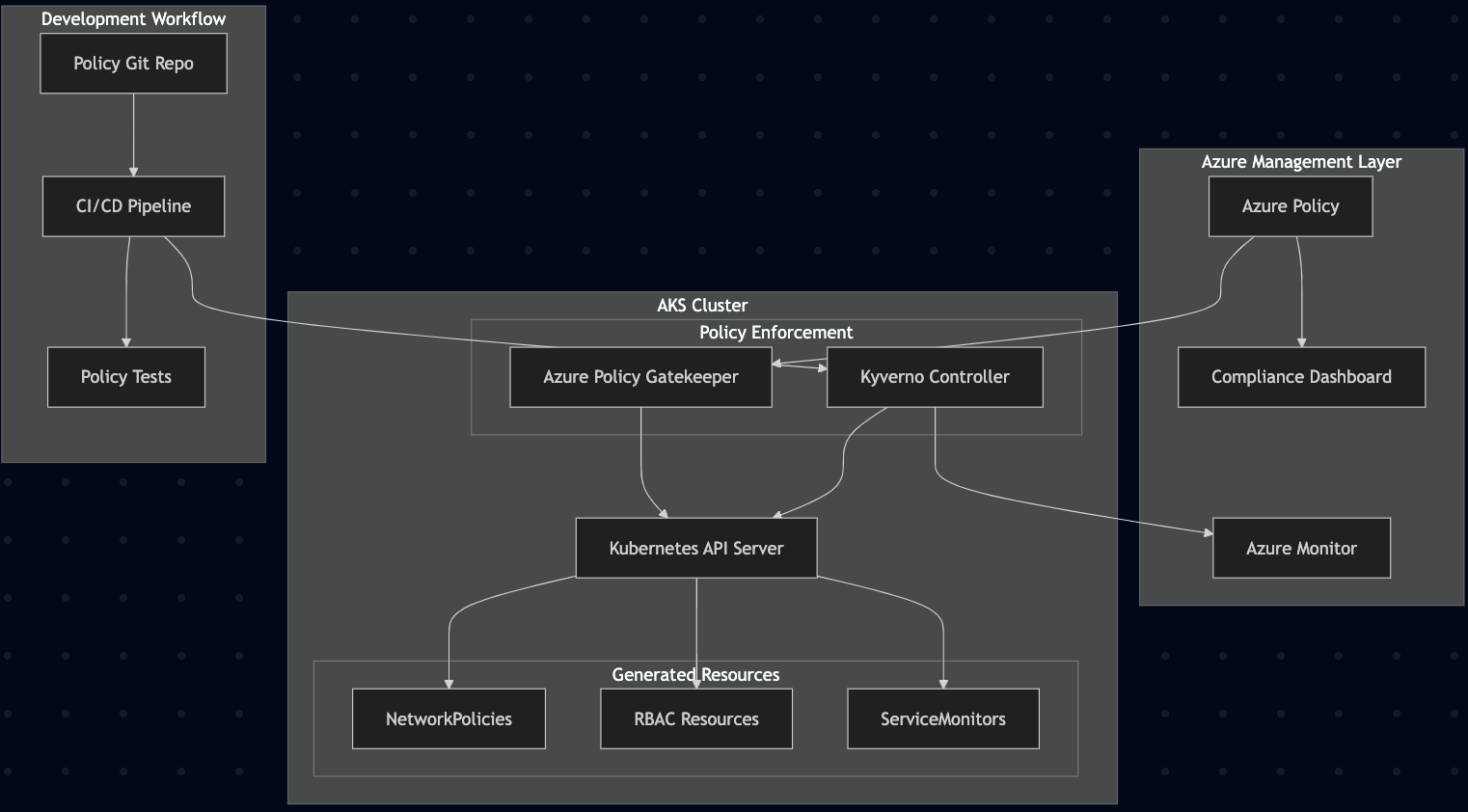
Rather than choosing one or the other, enterprise environments can leverage both engines strategically:
Architecture Overview
Strategic Division of Responsibilities
Azure Policy Handles:
- Compliance Reporting: SOC 2, PCI DSS, ISO 27001 evidence collection
- Organizational Governance: Cross-cluster policies and standards
- Business Stakeholder Communication: Executive dashboards and metrics
- Audit Trail: Centralized compliance monitoring and reporting
Kyverno Handles:
- Operational Automation: Resource generation and mutation
- Developer Experience: Automatic security baseline application
- Complex Logic: Multi-condition policies and advanced workflows
- Custom Resources: Service mesh, monitoring, and security tool integration
Implementation Guide: Hybrid Policy Strategy
Phase 1: Azure Policy Foundation
1.1 Deploy Azure Policy Add-on
# Enable Azure Policy add-on for AKS
az aks enable-addons \
  --resource-group "rg-aks-prod" \
  --name "aks-policy-demo" \
  --addons azure-policy
1.2 Implement Core Compliance Policies
# Deploy built-in AKS pod security baseline initiative
az policy assignment create \
  --name "aks-pod-security-baseline" \
  --display-name "AKS Pod Security Baseline (Linux workloads)" \
  --scope "/subscriptions/${SUBSCRIPTION}/resourceGroups/rg-aks-prod" \
  --policy-set-definition "Kubernetes cluster pod security baseline standards for Linux-based workloads"

# For more stringent requirements, use restricted standards
az policy assignment create \
  --name "aks-pod-security-restricted" \
  --display-name "AKS Pod Security Restricted Standards" \
  --scope "/subscriptions/${SUBSCRIPTION}/resourceGroups/rg-aks-prod" \
  --policy-set-definition "Kubernetes cluster pod security restricted standards for Linux-based workloads"
Note: These built-in initiative names can be found in the AKS policy reference. The portal displays them by these friendly names rather than GUIDs.
1.3 Configure Compliance Monitoring
# Create Log Analytics workspace for compliance data
az monitor log-analytics workspace create \
  --resource-group "rg-aks-prod" \
  --workspace-name "law-compliance-monitoring"

# Trigger an on-demand Azure Policy compliance scan
az policy state trigger-scan \
  --resource-group "rg-aks-prod"
Phase 2: Kyverno Installation and Configuration
2.1 Install Kyverno
# Install Kyverno using Helm with HA configuration
helm repo add kyverno https://kyverno.github.io/kyverno/
helm repo update

helm install kyverno kyverno/kyverno \
  --namespace kyverno \
  --create-namespace \
  --set admissionController.replicas=3 \
  --set backgroundController.replicas=2 \
  --set cleanupController.replicas=2 \
  --set reportsController.replicas=2

# Note: Kyverno 1.12+ automatically sets the AKS Admission Enforcer bypass annotation
# ("admissions.enforcer/disabled": "true") on its webhooks for compatibility
2.2 Deploy Foundation Policies
# Auto-generate NetworkPolicies for new namespaces
apiVersion: kyverno.io/v1
kind: ClusterPolicy
metadata:
  name: generate-network-policy
  annotations:
    policies.kyverno.io/title: Generate Default NetworkPolicy
    policies.kyverno.io/category: Security
    policies.kyverno.io/severity: high
    policies.kyverno.io/description: >-
      Automatically generates a default-deny NetworkPolicy for any new namespace
spec:
  background: false
  rules:
  - name: default-deny-all
    match:
      any:
      - resources:
          kinds:
          - Namespace
    exclude:
      any:
      - resources:
          namespaces:
          - kube-system
          - kube-public
          - kyverno
          - gatekeeper-system
    generate:
      synchronize: true
      apiVersion: networking.k8s.io/v1
      kind: NetworkPolicy
      name: default-deny-all
      namespace: "{{request.object.metadata.name}}"
      data:
        metadata:
          annotations:
            generated-by: kyverno
            policy-name: generate-network-policy
        spec:
          podSelector: {}
          policyTypes:
          - Ingress
          - Egress

---
# Auto-generate RBAC for development namespaces
apiVersion: kyverno.io/v1
kind: ClusterPolicy
metadata:
  name: generate-dev-rbac
  annotations:
    policies.kyverno.io/title: Generate Development RBAC
    policies.kyverno.io/category: Security
spec:
  background: false
  rules:
  - name: dev-namespace-rbac
    match:
      any:
      - resources:
          kinds:
          - Namespace
    preconditions:
      all:
      - key: "{{request.object.metadata.labels.environment || ''}}"
        operator: Equals
        value: development
    generate:
      synchronize: true
      apiVersion: rbac.authorization.k8s.io/v1
      kind: Role
      name: developer-access
      namespace: "{{request.object.metadata.name}}"
      data:
        rules:
        - apiGroups: [""]
          resources: ["pods", "services", "configmaps", "secrets"]
          verbs: ["get", "list", "create", "update", "patch", "delete"]
        - apiGroups: ["apps"]
          resources: ["deployments", "replicasets"]
          verbs: ["get", "list", "create", "update", "patch", "delete"]

---
# Automatic monitoring setup for labeled services
apiVersion: kyverno.io/v1
kind: ClusterPolicy
metadata:
  name: generate-service-monitor
  annotations:
    policies.kyverno.io/title: Generate ServiceMonitor for Prometheus
    policies.kyverno.io/category: Monitoring
spec:
  background: true
  rules:
  - name: create-service-monitor
    match:
      any:
      - resources:
          kinds:
          - Service
    preconditions:
      all:
      - key: "{{request.object.metadata.labels.monitoring || ''}}"
        operator: Equals
        value: "enabled"
      - key: "{{request.object.metadata.annotations['prometheus.io/scrape'] || ''}}"
        operator: Equals
        value: "true"
    generate:
      synchronize: true
      apiVersion: monitoring.coreos.com/v1
      kind: ServiceMonitor
      name: "{{request.object.metadata.name}}-monitor"
      namespace: "{{request.object.metadata.namespace}}"
      data:
        metadata:
          labels:
            app: "{{request.object.metadata.labels.app || request.object.metadata.name}}"
            monitoring: auto-generated
        spec:
          selector:
            matchLabels:
              app: "{{request.object.metadata.labels.app || request.object.metadata.name}}"
          endpoints:
          - port: metrics  # Service must expose a named port 'metrics'
            path: "{{request.object.metadata.annotations['prometheus.io/path'] || '/metrics'}}"
            # Note: If prometheus.io/port annotation is numeric (e.g., 8080),
            # ensure the Service has a named port and reference it here
Phase 3: Policy Integration and Coordination
3.1 Avoid Policy Conflicts
# Configure Kyverno to respect Azure Policy namespaces
apiVersion: v1
kind: ConfigMap
metadata:
  name: kyverno
  namespace: kyverno
data:
  excludeGroups: "system:serviceaccounts:kube-system,system:nodes,system:azure-policy"
  excludeUsernames: "system:azure-policy,system:kube-scheduler"
  resourceFilters: |
    [Event,*,*]
    [*,kube-system,*]
    [*,kube-public,*]
    [*,kube-node-lease,*]
    [*,gatekeeper-system,*]
3.2 Compliance Data Integration
# Export Kyverno compliance data to Azure Monitor
apiVersion: v1
kind: ConfigMap
metadata:
  name: fluent-bit-kyverno
  namespace: kyverno
data:
  fluent-bit.conf: |
    [SERVICE]
        Flush         5
        Log_Level     info
        Daemon        off

    [INPUT]
        Name              tail
        Path              /var/log/kyverno/policy-violations.log
        Parser            json

    [OUTPUT]
        Name              azure
        Match             *
        Customer_ID       ${WORKSPACE_ID}
        Shared_Key        ${WORKSPACE_KEY}
        Log_Type          KyvernoPolicyViolations
3.3 Policy Lifecycle Management
#!/bin/bash
# Policy deployment script with coordination

# Deploy Azure Policy first (compliance baseline)
echo "Deploying Azure Policy baseline..."
az policy assignment create \
  --name "aks-security-baseline" \
  --display-name "AKS Security Baseline" \
  --policy-set-definition "/providers/Microsoft.Authorization/policySetDefinitions/a8640138-9b0a-4a28-b8cb-1666c838647d" \
  --scope "/subscriptions/${SUBSCRIPTION}/resourceGroups/rg-aks-prod"
# Note: GUID above is "Kubernetes cluster pod security baseline standards for Linux-based workloads"

# Wait for Azure Policy deployment
sleep 60

# Deploy Kyverno policies (operational automation)
echo "Deploying Kyverno automation policies..."
kubectl apply -f kyverno-policies/

# Validate no conflicts
echo "Validating policy coordination..."
kubectl get events --field-selector reason=PolicyViolation -A
kubectl get policyreports -A
Phase 4: Monitoring and Alerting
4.1 Unified Policy Monitoring
Azure Policy Compliance (via Azure Resource Graph):
# Query Azure Policy compliance state using Azure Resource Graph
az graph query -q "
PolicyResources
| where type == 'microsoft.policyinsights/policystates'
| extend complianceState = tostring(properties.complianceState)
| summarize count() by complianceState
"
Kyverno Monitoring Options:
Option 1: Deploy Policy Reporter for web UI:
# Install Policy Reporter for Kyverno visualization
helm repo add policy-reporter https://kyverno.github.io/policy-reporter
helm install policy-reporter policy-reporter/policy-reporter \
  --namespace policy-reporter --create-namespace \
  --set monitoring.enabled=true \
  --set ui.enabled=true
Option 2: Use Prometheus metrics with Grafana:
# ServiceMonitor for Kyverno metrics (verify Service labels with kubectl get svc -n kyverno)
apiVersion: monitoring.coreos.com/v1
kind: ServiceMonitor
metadata:
  name: kyverno
  namespace: kyverno
spec:
  selector:
    matchLabels:
      app.kubernetes.io/name: kyverno-svc-metrics
  endpoints:
  - port: http-metrics   # Port name from the Service, not numeric 8000
    path: /metrics
    interval: 30s
4.2 Automated Alerting
# Create Azure Monitor alert for policy violations using CLI
# (installs the scheduled-query CLI extension if needed)
az monitor scheduled-query create \
  --resource-group "rg-monitoring" \
  --name "aks-policy-violations" \
  --scopes "/subscriptions/${SUBSCRIPTION}/resourceGroups/rg-aks-prod" \
  --condition "count > 5" \
  --condition-query "
    AzureActivity
    | where CategoryValue == 'Policy'
    | where ActivityStatusValue == 'Failure'
    | summarize count()
  " \
  --window-size 10m \
  --evaluation-frequency 5m \
  --action-groups "/subscriptions/${SUBSCRIPTION}/resourceGroups/rg-alerts/providers/Microsoft.Insights/actionGroups/security-team"
Real-World Implementation Examples
Use Case 1: Multi-Tenant Development Environment
Challenge: 50+ development teams need isolated namespaces with automatic security baselines and monitoring.
Solution:
# Azure Policy: Enforce organizational standards
{
  "displayName": "Development Environment Standards",
  "policyRule": {
    "if": {
      "allOf": [
        {"field": "type", "equals": "Microsoft.ContainerService/managedClusters"},
        {"field": "Microsoft.ContainerService/managedClusters/agentPoolProfiles[*].osDiskType", "notEquals": "Ephemeral"}
      ]
    },
    "then": {"effect": "deny"}
  }
}

# Kyverno: Automate namespace setup (multiple rules for multiple resources)
apiVersion: kyverno.io/v1
kind: ClusterPolicy
metadata:
  name: dev-namespace-automation
spec:
  background: false
  rules:
  - name: generate-network-policy
    match:
      any:
      - resources:
          kinds: ["Namespace"]
    preconditions:
      all:
      - key: "{{request.object.metadata.labels.environment || ''}}"
        operator: Equals
        value: development
    generate:
      synchronize: true
      apiVersion: networking.k8s.io/v1
      kind: NetworkPolicy
      name: default-deny
      namespace: "{{request.object.metadata.name}}"
      data:
        spec:
          podSelector: {}
          policyTypes: ["Ingress", "Egress"]
  - name: generate-resource-quota
    match:
      any:
      - resources:
          kinds: ["Namespace"]
    preconditions:
      all:
      - key: "{{request.object.metadata.labels.environment || ''}}"
        operator: Equals
        value: development
    generate:
      synchronize: true
      apiVersion: v1
      kind: ResourceQuota
      name: dev-quota
      namespace: "{{request.object.metadata.name}}"
      data:
        spec:
          hard:
            requests.cpu: "4"
            requests.memory: "8Gi"
            persistentvolumeclaims: "10"
Result: Teams get instant, secure, monitored namespaces while maintaining compliance.
Use Case 2: Production Security Automation
Challenge: Ensure all production workloads meet security baselines without blocking deployments.
Solution:
# Azure Policy: Compliance reporting
{
  "displayName": "Production Security Compliance",
  "policyRule": {
    "if": {
      "field": "Microsoft.ContainerService/managedClusters/securityProfile.azureKeyVaultKms.enabled",
      "notEquals": true
    },
    "then": {"effect": "auditIfNotExists"}
  }
}

# Kyverno: Automatic security hardening
apiVersion: kyverno.io/v1
kind: ClusterPolicy
metadata:
  name: production-security-automation
spec:
  rules:
  - name: add-security-context
    match:
      any:
      - resources:
          kinds: [Pod]
          namespaces: [production, prod-*]
    mutate:
      patchStrategicMerge:
        spec:
          securityContext:
            runAsNonRoot: true
            seccompProfile:
              type: RuntimeDefault
          containers:
          - (name): "*"
            securityContext:
              allowPrivilegeEscalation: false
              capabilities:
                drop: [ALL]
              readOnlyRootFilesystem: true
Result: Automatic security hardening with compliance visibility.
Performance and Cost Considerations
Resource Overhead
Both Azure Policy and Kyverno resource consumption depends heavily on:
- Number and complexity of policies
- Frequency of resource creation/updates
- Size of resources being evaluated
Azure Policy Gatekeeper - Microsoft's official estimates:
- <500 pods + ≤20 constraints: ~2 vCPU / 350 MB per component
- >500 pods + ≤40 constraints: ~3 vCPU / 600 MB per component
All technical specifications, including the 10k pod limit, 500 records cap, Linux-only add-on deployment, external data support (enabled since v1.4.0), and these resource estimates, are documented on the same Microsoft Learn page.
Kyverno: Variable based on controller configuration and policy count
- See Kyverno High Availability documentation for scaling recommendations
- Monitor actual usage with:
kubectl top pods -n kyverno
Cost-Benefit Analysis
Azure Policy:
- ✅ No additional infrastructure costs (included in AKS)
- ✅ Managed service with Azure SLA
- ⚠️ Limited automation may require additional tooling or manual processes
Kyverno:
- ➕ Additional compute resources required (varies by workload)
- ➕ Open source with active community support
- ✅ Automation capabilities can significantly reduce operational overhead
Recommendation: Start with baseline monitoring of your actual resource usage before projecting costs. Both solutions have negligible impact on most clusters when properly configured.
Decision Framework
When to Use Azure Policy Only
✅ Optimal Scenarios:
- Compliance-first environments with simple automation needs
- Multi-subscription governance requirements
- Teams without deep Kubernetes expertise
- Environments prioritizing operational simplicity
❌ Not Suitable When:
- Complex resource generation is required
- Custom resource management is needed
- Developer experience automation is priority
When to Use Kyverno Only
✅ Optimal Scenarios:
- Kubernetes-native environments
- Complex automation requirements
- Multi-cloud or hybrid deployments
- Teams with strong Kubernetes expertise
❌ Not Suitable When:
- Enterprise compliance dashboards are required
- Multi-cluster management is needed
- Minimal operational overhead is priority
When to Use Hybrid Approach
✅ Optimal Scenarios:
- Enterprise environments with both compliance and automation needs
- Multiple stakeholder types (auditors, developers, operators)
- Large-scale deployments with complex requirements
- Organizations wanting best-of-breed solutions
Implementation Checklist
Pre-Implementation Assessment
- [ ] Identify compliance requirements (SOC 2, PCI DSS, ISO 27001, etc.)
- [ ] Catalog automation needs (resource generation, mutation, cleanup)
- [ ] Assess team Kubernetes expertise levels
- [ ] Evaluate multi-cluster management requirements
- [ ] Determine budget for additional infrastructure
Phase 1: Azure Policy Foundation
- [ ] Enable Azure Policy add-on on AKS clusters
- [ ] Deploy core compliance policy initiatives
- [ ] Configure compliance monitoring and reporting
- [ ] Train audit team on Azure Policy dashboards
- [ ] Establish policy violation response procedures
Phase 2: Kyverno Automation
- [ ] Deploy Kyverno in test environment
- [ ] Develop and test automation policies
- [ ] Create policy deployment pipelines
- [ ] Configure monitoring and alerting
- [ ] Train operations team on Kyverno management
Phase 3: Integration and Coordination
- [ ] Configure namespace exclusions to prevent conflicts
- [ ] Set up unified monitoring and alerting
- [ ] Create escalation procedures for policy violations
- [ ] Document troubleshooting procedures
- [ ] Establish policy lifecycle management processes
Phase 4: Continuous Improvement
- [ ] Monitor policy performance and effectiveness
- [ ] Gather feedback from development teams
- [ ] Optimize policies based on real-world usage
- [ ] Regular policy audits and updates
- [ ] Expand automation based on operational insights
Troubleshooting Common Issues
Policy Conflicts
Issue: Azure Policy and Kyverno policies conflict, causing resource creation failures.
Symptoms:
kubectl describe pod failing-pod
# Events show multiple admission controller failures
Resolution:
# Configure Kyverno to exclude Azure Policy users (ConfigMap/kyverno)
apiVersion: v1
kind: ConfigMap
metadata:
  name: kyverno
  namespace: kyverno
data:
  excludeUsernames: "system:azure-policy,system:aks-*"
  excludeGroups: "system:serviceaccounts:gatekeeper-system"
  resourceFilters: |
    [*,gatekeeper-system,*]
Performance Issues
Issue: Policy evaluation slowing down pod creation.
Diagnosis:
# Check Kyverno performance metrics
kubectl top pods -n kyverno
kubectl get events --field-selector reason=PolicyViolation -A

# Check Azure Policy compliance state
az policy state summarize --subscription $SUBSCRIPTION_ID

# Or list non-compliant resources
az policy state list --filter "(isCompliant eq false)" --top 50
Resolution:
# 1) Per-policy timeout configuration
apiVersion: kyverno.io/v1
kind: ClusterPolicy
metadata:
  name: example-policy
spec:
  webhookTimeoutSeconds: 10  # Policy-specific timeout
  rules: []  # your policy rules

---
# 2) Helm values to optimize background scans and events
# (apply during installation or upgrade)
reportsController:
  container:
    extraArgs:
      backgroundScan: "true"  # Enable/disable background scans
kyverno:
  omitEvents: "PolicyApplied,PolicySkipped"  # Reduce event noise
Compliance Data Gaps
Issue: Missing compliance data in unified reporting.
Resolution:
# Verify Log Analytics configuration
az monitor log-analytics workspace show \
  --resource-group "rg-monitoring" \
  --workspace-name "law-compliance"

# Check Kyverno policy reports
kubectl get policyreports -A
kubectl get clusterpolicyreports
Conclusion and Strategic Recommendations
The choice between Azure Policy and Kyverno isn't binary, it's strategic. Azure Policy excels at enterprise governance and compliance reporting, while Kyverno provides unmatched automation and operational efficiency. For enterprise AKS environments, a hybrid approach delivers optimal outcomes:
Key Takeaways:
- Azure Policy for Governance: Use for compliance reporting, organizational standards, and stakeholder communication
- Kyverno for Operations: Use for resource automation, developer experience, and complex policy logic
- Hybrid for Enterprise: Combine both for comprehensive governance with operational efficiency
- Start Simple: Begin with Azure Policy for compliance, add Kyverno for automation as needs evolve
Strategic Recommendations:
- Small/Medium Deployments: Start with Azure Policy, evaluate Kyverno for specific automation needs
- Enterprise Deployments: Implement hybrid approach from the beginning
- Compliance-Heavy Industries: Azure Policy foundation with Kyverno augmentation
- DevOps-Mature Organizations: Kyverno-first with Azure Policy for reporting
Next Steps:
- Assess your specific compliance and automation requirements
- Pilot the hybrid approach in a development environment
- Measure the operational efficiency gains and compliance improvements
- Gradually expand to production with lessons learned
The future of Kubernetes governance lies not in choosing sides, but in strategically combining the strengths of both Azure-native and Kubernetes-native solutions. By implementing a thoughtful hybrid approach, organizations can achieve both compliance excellence and operational efficiency; a combination that drives both technical and business success.
References and Further Reading
Azure Policy Documentation
- Azure Policy for Kubernetes - Core concepts and limitations
- Azure Policy mutate effect - Mutation capabilities and examples
- Built-in AKS policy definitions - Complete list of available policies
- Azure Policy state CLI commands - Compliance scanning and management
- Governance Options comparison - Microsoft's architecture guidance
Kyverno Documentation
- Kyverno Documentation - Official documentation home
- Generate Rules - Resource generation capabilities
- Cleanup Policies - Automatic resource cleanup
- High Availability - Scaling and resource recommendations
- Installation Methods - Deployment options including Helm
- Configuring Kyverno - ConfigMap settings and exclusions
- Policy Testing - Unit testing for policies
- Variables and JMESPath - Advanced policy syntax
Monitoring and Observability
- Policy Reporter - Web UI for Kyverno policy results
- Kyverno Policy Reports - Native reporting capabilities
Policy Libraries and Examples
- Kyverno Policy Library - Ready-to-use policies
- Azure Policy Samples for AKS
- Add Network Policy example - Auto-generation pattern
Compliance and Security Standards
- Kubernetes Security Best Practices
- NIST Application Container Security Guide
- CIS Kubernetes Benchmark
- CNCF Policy Working Group
Published as part of the AKS Security Blog Series - Bridging DevSecOps and CISO Perspectives. Previous: "Azure CNI with Cilium: Beyond the Basics" | Next: "Supply Chain Security on AKS: From Image Signing to Attestation"