

The Hidden Limitations of Azure's Managed Cilium
Consider this scenario: Your security team mandates Layer 7 HTTP policies to prevent data exfiltration, DNS-based filtering to block malicious domains, and encrypted pod-to-pod communication for PCI compliance. You deploy Azure CNI with Cilium, expecting these capabilities, only to discover they require "Advanced Container Networking Services".
This post explores what Azure's documentation doesn't tell you about Cilium limitations and provides a comprehensive guide to deploying full Cilium OSS on AKS when enterprise security requirements demand it.
The Azure CNI Cilium Reality Check
What Microsoft's Documentation Doesn't Emphasize
Azure CNI powered by Cilium delivers on its promise of high-performance eBPF networking, but the security and observability features that distinguish Cilium from traditional CNIs are either limited or missing entirely. Microsoft's own documentation confirms these feature gates[1], with their feature comparison table explicitly showing that FQDN filtering, L7 policies, and Container Network Observability require ACNS. The documentation also notes that ipBlock cannot select pod or node IPs in network policies (though a workaround exists). Importantly, AKS manages the Cilium configuration in the managed offering, but for custom configuration or unsupported features, Microsoft recommends using BYO-CNI.
Critical Missing Capabilities:
- L7 Network Policies: HTTP/gRPC application-layer filtering requires ACNS[1:1]
- DNS/FQDN Policies: Domain-based security controls require ACNS[1:2]
- Hubble Observability: No real-time service dependency mapping or flow visibility without ACNS[1:3]
- WireGuard Encryption: Available via ACNS (currently in public preview)[2]
- Cluster Mesh: Multi-cluster connectivity not documented as supported
Network Policy Limitations:
# This NetworkPolicy configuration will NOT work with Azure CNI Cilium
apiVersion: networking.k8s.io/v1
kind: NetworkPolicy
spec:
  ingress:
  - from:
    - ipBlock:
        cidr: 10.0.0.0/16  # Cannot target node/pod IPs - documented limitation[^1]
The Enterprise Security Gap
For organizations implementing zero-trust networking or meeting compliance requirements like PCI DSS, SOC 2, or FedRAMP, these limitations create significant challenges:
- PCI DSS Requirement 1: Network segmentation requires granular traffic filtering that basic L3/L4 policies cannot provide
- SOC 2 CC6.1: Logical access security benefits from application-layer policy enforcement
- FedRAMP AC-4: Information flow enforcement may require DNS filtering and encrypted communications
Full Cilium OSS on AKS: Implementation Strategy
Architecture Overview
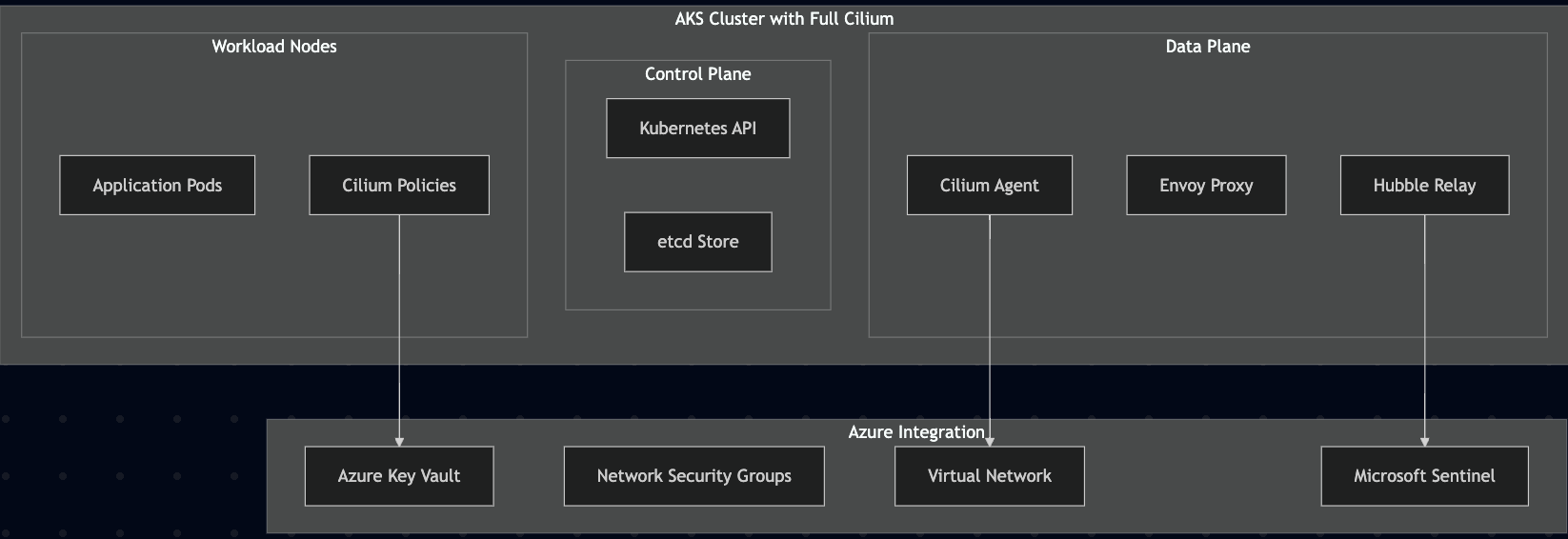
Deploying full Cilium OSS on AKS requires replacing the managed Azure CNI while maintaining integration with Azure networking and security services:
Pre-Implementation Assessment
Before deploying full Cilium, evaluate your specific requirements:
Security Requirements Checklist:
- [ ] L7 application-layer policies required
- [ ] DNS-based filtering for threat prevention
- [ ] Pod-to-pod encryption mandated by compliance
- [ ] Advanced observability for incident response
- [ ] Multi-cluster connectivity needed
Infrastructure Readiness:
- [ ] AKS cluster version 1.30+ (LTS) recommended for optimal compatibility
- [ ] Node pool with sufficient resources for Cilium + Envoy
- [ ] Azure Key Vault integration for certificate management
- [ ] Log Analytics workspace (for Microsoft Sentinel / custom KQL on flow logs)
Step-by-Step Implementation Guide
Phase 1: Cluster Preparation
1.1 Create AKS Cluster with Custom CNI Configuration
# Create AKS cluster without managed CNI
az aks create \
  --resource-group "rg-aks-prod" \
  --name "aks-cilium-prod" \
  --kubernetes-version "1.30.0" \
  --network-plugin "none" \
  --pod-cidr "10.244.0.0/16" \
  --service-cidr "10.0.0.0/16" \
  --dns-service-ip "10.0.0.10" \
  --enable-managed-identity \
  --enable-workload-identity \
  --enable-oidc-issuer
Important: Ensure Service CIDR (10.0.0.0/16) doesn't overlap with Pod CIDR (10.244.0.0/16), node subnets, or any VNet/peered/on-premises ranges. Service CIDR must also not overlap with any peered VNets or on-premises network ranges.
1.2 Configure Node Pool for Cilium Requirements
# Add dedicated node pool with enhanced networking
az aks nodepool add \
  --cluster-name "aks-cilium-prod" \
  --resource-group "rg-aks-prod" \
  --name "ciliumpool" \
  --node-count 3 \
  --node-vm-size "Standard_D4s_v3" \
  --max-pods 110 \
  --enable-cluster-autoscaler \
  --min-count 3 \
  --max-count 10
Phase 2: Cilium Installation with Enterprise Features
2.1 Install Cilium with Complete Feature Set
# Add Cilium Helm repository
helm repo add cilium https://helm.cilium.io/
helm repo update

# Get API server endpoint for kube-proxy replacement (optional)
APIVER=$(kubectl config view --minify -o jsonpath='{.clusters[0].cluster.server}')
HOST=$(echo $APIVER | sed -E 's#https?://([^:/]+).*#\1#')
PORT=$(echo $APIVER | sed -E 's#https?://[^:/]+:([0-9]+).*#\1#')
PORT=${PORT:-443}

# Install Cilium with enterprise features for BYO-CNI on AKS
helm install cilium cilium/cilium \
  --version 1.18.2 \
  --namespace kube-system \
  --set operator.replicas=2 \
  --set aksbyocni.enabled=true \
  --set azure.enabled=false \
  --set ipam.mode=cluster-pool \
  --set ipam.operator.clusterPoolIPv4PodCIDRList=10.244.0.0/16 \
  --set ipam.operator.clusterPoolIPv4MaskSize=24 \
  --set tunnel=vxlan \
  --set l7Proxy=true \
  --set hubble.enabled=true \
  --set hubble.relay.enabled=true \
  --set hubble.ui.enabled=true \
  --set hubble.metrics.enabled="{dns,drop,tcp,flow,port-distribution,icmp,http}" \
  --set hubble.metrics.enableOpenMetrics=true \
  --set hubble.networkPolicyCorrelation.enabled=true \
  --set prometheus.enabled=true \
  --set operator.prometheus.enabled=true \
  --set kubeProxyReplacement=true \
  --set k8sServiceHost="${HOST}" \
  --set k8sServicePort="${PORT}"

# For WireGuard encryption (optional - Cilium auto-manages keys)
# Cilium OSS supports WireGuard: --set encryption.enabled=true --set encryption.type=wireguard
Note: If you haven't disabled the AKS kube-proxy DaemonSet, consider usingkubeProxyReplacement=probeto avoid conflicts. Kube-proxy removal on AKS is still a preview feature requiring explicit configuration. If you disable kube-proxy, keepk8sServiceHost/Portset as shown. See Configure kube-proxy in AKS for the preview process.
2.2 Verify Installation and eBPF Capabilities
# Check Cilium status
kubectl -n kube-system exec ds/cilium -- cilium status --verbose

# Verify eBPF programs loaded
kubectl -n kube-system exec ds/cilium -- cilium bpf lb list
kubectl -n kube-system exec ds/cilium -- cilium bpf ct list global
Phase 3: Advanced Security Policy Implementation
3.1 Layer 7 HTTP Security Policies
# Allow specific HTTP paths with L7 filtering
apiVersion: cilium.io/v2
kind: CiliumNetworkPolicy
metadata:
  name: api-l7-security
  namespace: production
spec:
  endpointSelector:
    matchLabels:
      app: api-backend
  ingress:
  - fromEndpoints:
    - matchLabels:
        app: frontend
    toPorts:
    - ports:
      - port: "8080"
        protocol: TCP
      rules:
        http:
        # Only allow these specific paths - everything else denied by default
        - method: "GET"
          path: "^/api/v1/.*$"
        - method: "POST"
          path: "^/api/v1/(users|orders)$"
          headerMatches:
          - name: "Content-Type"
            value: "^application/json$"
        # Admin endpoints are implicitly denied by not being in the allow list
Note: L7 policy violations return protocol-appropriate denies (e.g., HTTP 403 Forbidden), not raw packet drops. This provides a better debugging experience while maintaining security.
3.2 DNS-Based Egress Control
# Control egress traffic using FQDN allowlist
apiVersion: cilium.io/v2
kind: CiliumNetworkPolicy
metadata:
  name: dns-egress-control
  namespace: production
spec:
  endpointSelector:
    matchLabels:
      tier: backend
  egress:
  # Allow DNS queries to kube-dns
  - toEndpoints:
    - matchLabels:
        k8s:io.kubernetes.pod.namespace: kube-system
        k8s-app: kube-dns
    toPorts:
    - ports:
      - port: "53"
        protocol: UDP
      - port: "53"
        protocol: TCP
      rules:
        dns:
        - matchPattern: "*"
  # Allow only specific external services by FQDN
  - toFQDNs:
    - matchName: "api.stripe.com"
    - matchName: "api.sendgrid.com"
    - matchPattern: "*.azure.com"
    toPorts:
    - ports:
      - port: "443"
        protocol: TCP
  # Malicious domains are blocked by default (not in allowlist)
3.3 Workload Identity Integration with Azure Key Vault
# Service account for Cilium certificate management
apiVersion: v1
kind: ServiceAccount
metadata:
  name: cilium-cert-manager
  namespace: kube-system
  annotations:
    azure.workload.identity/client-id: "YOUR_IDENTITY_CLIENT_ID"
---
# ClusterRole for certificate operations
apiVersion: rbac.authorization.k8s.io/v1
kind: ClusterRole
metadata:
  name: cilium-cert-manager
rules:
- apiGroups: [""]
  resources: ["secrets"]
  verbs: ["get", "list", "create", "update", "patch"]
---
# Certificate management job
apiVersion: batch/v1
kind: CronJob
metadata:
  name: cilium-cert-rotation
  namespace: kube-system
spec:
  schedule: "0 2 * * 0"  # Weekly rotation
  jobTemplate:
    spec:
      template:
        spec:
          serviceAccountName: cilium-cert-manager
          containers:
          - name: cert-rotator
            image: "mcr.microsoft.com/azure-cli:latest"
            command:
            - /bin/bash
            - -c
            - |
              # Retrieve certificates from Azure Key Vault
              az keyvault secret show \
                --vault-name "kv-cilium-certs" \
                --name "cilium-ca-cert" \
                --query "value" -o tsv | base64 -d > /tmp/ca.crt

              # Update Cilium certificate secret
              kubectl create secret generic cilium-ca-cert \
                --from-file=ca.crt=/tmp/ca.crt \
                --dry-run=client -o yaml | kubectl apply -f -
          restartPolicy: OnFailure
Production Tip: Use Azure Key Vault CSI Driver to mountcilium-ca-certdirectly into Cilium pods, or cert-manager for automated certificate lifecycle management. Avoid runningazCLI from CronJobs in production.
Phase 4: Observability and Monitoring Integration
4.1 Hubble Configuration for Security Monitoring
Note: Hubble configuration is automatically managed via the Helm installation. The relay service, peer communication, and metrics service are all configured through Helm values. Whenhubble.metrics.enabledis set, Helm automatically creates a headlesshubble-metricsService that exposes metrics from the Cilium agents.
4.2 Microsoft Sentinel Integration for Security Events
# Create Log Analytics custom table for Hubble flows
az monitor log-analytics workspace table create \
  --resource-group "rg-aks-prod" \
  --workspace-name "law-aks-security" \
  --name "CiliumFlows_CL" \
  --columns '[
    {
      "name": "TimeGenerated",
      "type": "datetime"
    },
    {
      "name": "SourcePod",
      "type": "string"
    },
    {
      "name": "DestinationService",
      "type": "string"
    },
    {
      "name": "Verdict",
      "type": "string"
    },
    {
      "name": "L7Protocol",
      "type": "string"
    },
    {
      "name": "HTTPMethod",
      "type": "string"
    },
    {
      "name": "HTTPPath",
      "type": "string"
    }
  ]'
4.3 Hubble Flow Export Configuration
# Enable Hubble Exporter to write flow logs to stdout (simplest for log collection)
helm upgrade cilium cilium/cilium -n kube-system \
  --set hubble.export.static.enabled=true \
  --set hubble.export.static.filePath=stdout[^3] \
  --set hubble.metrics.enableOpenMetrics=true[^4] \
  --set hubble.redact.enabled=true \
  --set-json hubble.redact.http.headers.allow='[":authority","user-agent"]'
# Hubble flows now go to cilium-agent stdout with sensitive headers redacted
Note: With stdout export enabled, Hubble flows are written to the Cilium agent's stdout and automatically collected by your cluster's log aggregation system (Azure Monitor Agent, container insights, etc.). No additional DaemonSet or hostPath mounting is required.
Alternative: Azure Container Network Observability (ACNS)
For Azure-native integration, enable ACNS which provides built-in Hubble flow collection and routing to Azure Monitor without additional configuration.
Performance and Resource Considerations
Resource Requirements Comparison
| Component | Azure CNI Cilium | Full Cilium OSS | Additional Overhead |
|---|---|---|---|
| Memory per Node | ~200MB | ~400MB | +200MB |
| CPU per Node | ~100m | ~200m | +100m |
| Network Latency | Baseline | +0.1-0.5ms | Minimal |
| Storage (logs) | Basic | 1-5GB/day | Depends on flow volume |
Performance Optimization Configuration
# Apply performance optimizations via Helm upgrade
helm upgrade cilium cilium/cilium -n kube-system \
  --set loadBalancer.algorithm=maglev \
  --set loadBalancer.acceleration=native \
  --set bpf.masquerade=true \
  --set bpfClockProbe=true \
  --set bpf.preallocateMaps=true \
  --set dashboards.enabled=true \
  --set operator.dashboards.enabled=true \
  --set hubble.metrics.serviceMonitor.enabled=true
Note:loadBalancer.acceleration=native(XDP) only helps in native routing; withtunnel=vxlanit has no effect. To benefit from XDP LB acceleration, disable tunneling (--set tunnel=disabled) and ensure your network can route Pod CIDRs.
Compliance and Audit Evidence
SOC 2 Control Mapping
CC6.1 - Logical Access Security
# Generate access control evidence
kubectl get ciliumnetworkpolicies -A -o custom-columns="NAMESPACE:.metadata.namespace,NAME:.metadata.name,ENDPOINTS:.spec.endpointSelector.matchLabels" > soc2-access-controls.csv

# Export policy compliance report (from Cilium agent pod)
kubectl -n kube-system exec ds/cilium -- cilium policy get --all-namespaces --output json > cilium-policies-$(date +%Y%m%d).json
CC7.1 - System Monitoring
# Microsoft Sentinel KQL query for security monitoring evidence
CiliumFlows_CL
| where TimeGenerated >= ago(30d)
| where Verdict_s == "DENIED"
| summarize DeniedAttempts = count() by SourcePod_s, DestinationService_s, bin(TimeGenerated, 1d)
| order by TimeGenerated desc
PCI DSS Requirement 1 - Firewall Evidence
# Template for PCI DSS network segmentation evidence
apiVersion: cilium.io/v2
kind: CiliumNetworkPolicy
metadata:
  name: pci-cardholder-isolation
  namespace: payment-processing
  annotations:
    compliance.framework: "PCI DSS"
    compliance.requirement: "Req 1.2"
    compliance.description: "Cardholder data environment isolation"
spec:
  endpointSelector:
    matchLabels:
      app: payment-processor
      data-classification: cardholder
  ingress:
  # Only allow access from authorized payment frontend
  - fromEndpoints:
    - matchLabels:
        app: payment-frontend
        security-zone: pci
    toPorts:
    - ports:
      - port: "8443"
        protocol: TCP
      rules:
        http:
        - method: "POST"
          path: "^/api/payment/process$"
          headerMatches:
          - name: "Authorization"
            value: "^Bearer\\s.+$"
  egress:
  # Restrict egress to only necessary services
  - toEndpoints:
    - matchLabels:
        app: payment-gateway
        vendor: authorized
    toPorts:
    - ports:
      - port: "443"
        protocol: TCP
Troubleshooting Common Issues
eBPF Program Loading Failures
Issue: Cilium pods stuck in Init:0/1 state with eBPF compilation errors.
Diagnosis:
# Check eBPF compilation status
kubectl -n kube-system logs ds/cilium -c cilium-agent | grep -i "bpf"

# Verify kernel eBPF support
kubectl -n kube-system exec ds/cilium -- cilium bpf config
Resolution:
# Update node image to get newer kernel version
az aks nodepool upgrade \
  --cluster-name "aks-cilium-prod" \
  --resource-group "rg-aks-prod" \
  --name "ciliumpool" \
  --node-image-only

# Verify kernel version after upgrade
kubectl get nodes -o wide
WireGuard Encryption Issues
Issue: Pod-to-pod traffic not encrypted despite WireGuard configuration.
Diagnosis:
# Check WireGuard interface creation
kubectl -n kube-system exec ds/cilium -- ip link show cilium_wg0

# Verify encryption status
kubectl -n kube-system exec ds/cilium -- cilium encryption status
Resolution:
# Enable WireGuard encryption via Helm (Cilium auto-manages keys)
helm upgrade cilium cilium/cilium -n kube-system \
  --set encryption.enabled=true \
  --set encryption.type=wireguard

# Verify WireGuard is active
kubectl -n kube-system exec ds/cilium -- cilium encryption status
Note: Cilium automatically generates and manages WireGuard keys. No manual secret creation is needed.
DNS Policy Resolution Problems
Issue: FQDN-based policies not matching expected domains.
Diagnosis:
# Check DNS proxy configuration
kubectl -n kube-system exec ds/cilium -- cilium fqdn cache list

# Monitor DNS queries
kubectl -n kube-system exec ds/cilium -- cilium monitor --type drop
Resolution:
# Configure FQDN policy with DNS proxy
apiVersion: cilium.io/v2
kind: CiliumNetworkPolicy
metadata:
  name: dns-policy-debug
spec:
  endpointSelector:
    matchLabels:
      app: test-app
  egress:
  # Allow DNS lookups first
  - toEndpoints:
    - matchLabels:
        k8s:io.kubernetes.pod.namespace: kube-system
        k8s-app: kube-dns
    toPorts:
    - ports:
      - port: "53"
        protocol: UDP
      - port: "53"
        protocol: TCP
  # Then allow HTTPS to resolved FQDNs
  - toFQDNs:
    - matchName: "api.example.com"
    toPorts:
    - ports:
      - port: "443"
        protocol: TCP
Note: DNS TTL configuration is controlled via Helm values (--set dnsProxy.minTtl=300), not in the policy YAML.Business Case and ROI Analysis
Total Cost of Ownership Comparison
Azure CNI with Advanced Services:
- AKS Standard tier provides SLA guarantees (Free tier available without SLA)
- Advanced Container Networking Services billed per node per hour
- See Azure Kubernetes Service Pricing and ACNS Pricing for current rates
Full Cilium OSS Implementation:
- Additional operational overhead: 20-40 hours/month
- Infrastructure costs: ~10-15% (~200-438 MiB/agent) increase in compute resources for Cilium + Envoy
- Training and expertise development required
- Ongoing maintenance and upgrade management
Risk and Compliance Value
Risk Reduction Estimates (Illustrative):
- Data Breach Prevention: L7 policies can significantly reduce application-layer attack surface
- Compliance Automation: Automated policy enforcement can reduce audit preparation time
- Incident Response: Enhanced observability can reduce mean time to detection
Compliance Benefits (Illustrative):
- SOC 2 Audit Preparation: Automated evidence collection streamlines audit processes
- PCI DSS Assessment: Documented network segmentation simplifies compliance demonstration
- Regulatory Compliance: Demonstrable security controls help meet regulatory requirements
Decision Framework Matrix
| Scenario | Azure CNI Cilium | Full Cilium OSS | Recommendation |
|---|---|---|---|
| Cost-sensitive, basic security | ✅ Optimal | ❌ Over-engineered | Azure managed |
| Compliance-driven environment | ⚠️ May require add-ons | ✅ Complete solution | Full Cilium |
| Multi-cloud/hybrid strategy | ❌ Azure-specific | ✅ Portable | Full Cilium |
| High-security requirements | ❌ Feature limitations | ✅ Complete capabilities | Full Cilium |
| Rapid deployment priority | ✅ Turnkey solution | ❌ Complex setup | Azure managed |
Conclusion and Next Steps
Azure CNI powered by Cilium provides excellent eBPF networking performance but falls short of the advanced security capabilities that enterprise environments often require. For organizations implementing zero-trust networking, meeting strict compliance requirements, or requiring advanced observability, deploying full Cilium OSS on AKS provides access to the complete feature set while maintaining Azure integration.
Key Takeaways:
- Azure's managed Cilium is ideal for performance-focused deployments with basic security needs
- Full Cilium OSS is necessary for L7 policies, encryption, advanced observability, and compliance
- Implementation complexity is moderate but requires eBPF expertise and ongoing operational investment
- ROI justification depends on compliance requirements and security risk tolerance
Recommended Next Steps:
- Assess Requirements: Use the decision framework to evaluate your specific needs
- Pilot Implementation: Deploy both solutions in development environments for comparison
- Stakeholder Alignment: Ensure security, compliance, and operations teams understand trade-offs
- Phased Migration: If choosing full Cilium, plan gradual rollout with comprehensive testing
For organizations pursuing Microsoft MVP recognition, contributing to the community documentation of these implementation patterns and sharing lessons learned helps advance the ecosystem while demonstrating thought leadership in enterprise Kubernetes security.
References and Further Reading
Official Documentation
- Azure CNI powered by Cilium - Microsoft Learn
- Bring your own CNI plugin with AKS
- WireGuard Encryption with ACNS
- AKS Node Image Upgrade
- Cilium Documentation
- Cilium Helm Reference
- Cilium Cluster-Pool IPAM
- Cilium DNS-Based Policies
- Cilium L7 Policy Language
- Cilium Metrics and Monitoring
- Hubble Exporter Configuration
- Kubernetes Without kube-proxy
- eBPF and Cilium - CNCF Landscape
Community Resources
- Azure AKS GitHub Issues - Cilium-related
- Cluster Mesh Support Issue #5194
- Cilium Community Slack
- eBPF Foundation
Pricing Resources
Compliance Frameworks
Published as part of the AKS Security Blog Series - Bridging DevSecOps and CISO Perspectives. Next: "Policy Engine Face-off: Azure Policy vs. Kyverno for AKS Governance"